WhatsCRM Hub Business OS — Chat, AI, sales & commission in one system
Business OS

Your business has plenty of apps. What it doesn't have yet is a system.
Conversations come in from every channel, AI reads and scores them, they turn into leads and quotes, and then into team targets and commission that actually gets paid. All of that already happens in your business today. It's just spread across five tools that don't talk to each other. WhatsCRM Hub puts it in one system that you can run yourself or resell under your own brand.
$499
$299
Web and mobile app in one license
One-time purchase · Lifetime
A real person answers, not a bot. No commitment, no credit card.
Multi-tenant SaaS, resale allowed 100% white-label and rebrandable 4 languages & 4 currencies Web + mobile app
What fits inside one system
17
work modules, one login
6
message channels, one inbox
4
languages & currencies
2
platforms: web & mobile
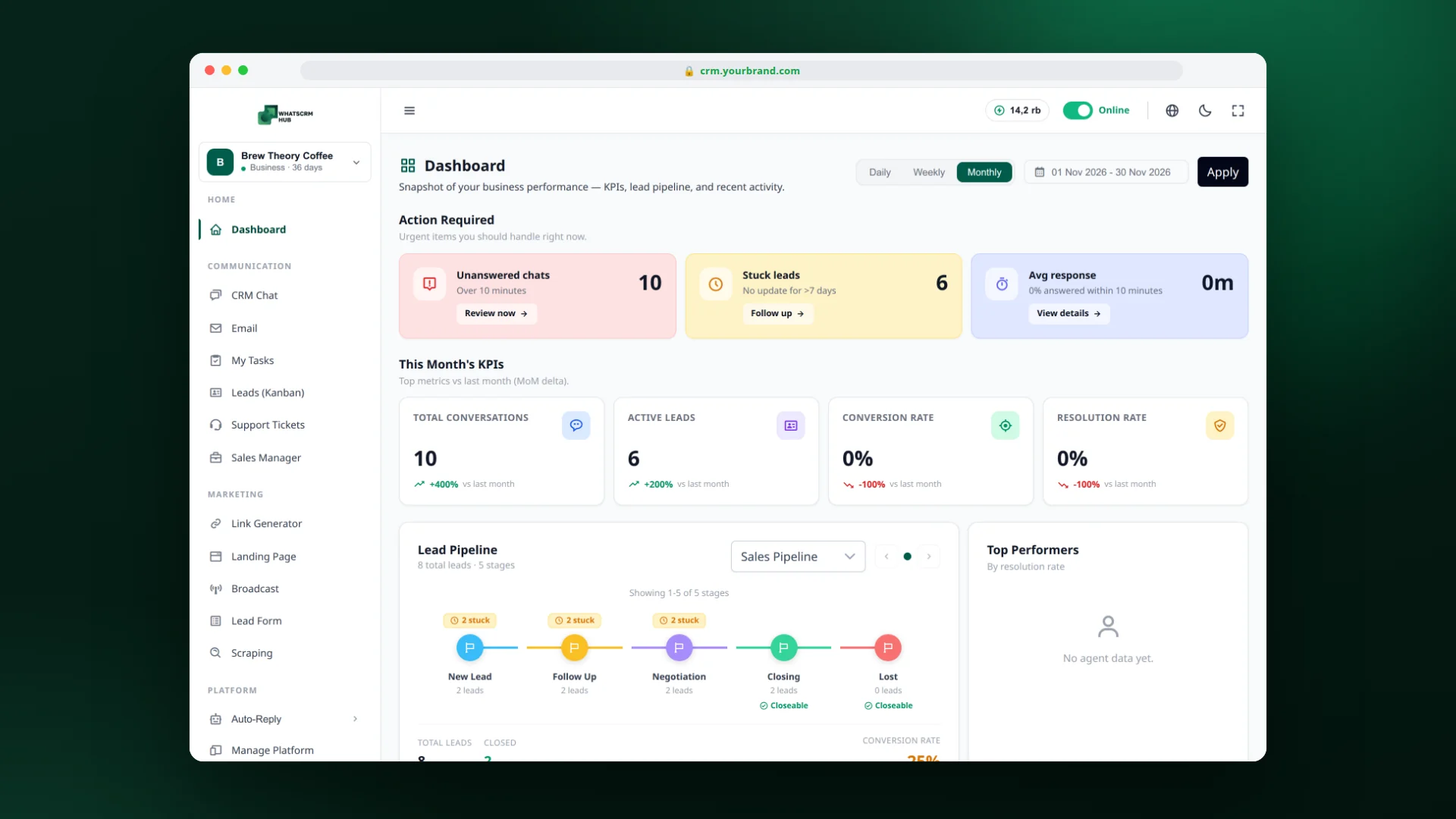
Dashboard: what needs action today, this month’s KPIs, and where the pipeline stands. It's the first screen you open every morning.
What this system covers

The whole chain, start to finish

WhatsCRM Hub covers four jobs you'd normally buy from four different vendors. The tools were never the expensive part. The handoffs between them were.

01

Receive the conversations

WhatsApp (multi-device or the official API), Instagram DMs, Facebook Messenger, Telegram, website live chat, and email all land on one screen your whole team shares.

02

Let AI read them

AI reads every conversation and gives you an intent score, the buying stage, what the customer wants, the objection that's still open, questions nobody answered, and a next step with a draft reply.

03

Turn them into leads & quotes

Contacts move through stages you set up yourself, then turn into numbered quotes, each with its own price, deadline, and closing target.

04

Run teams, targets & commission

As soon as a quote is marked won, its commission is calculated and recorded. Team targets, individual targets, manager commission, and bonuses all live in the same flow.

Here's what you can't get when every feature comes from a different vendor: a scraped prospect gets a broadcast, replies into the inbox, moves up the kanban, and becomes a quote. One person, one continuous history.
The problem

Your chat app isn't the problem. The problem is that nothing gets recorded.

Customers buy through conversation, and that's fine. The trouble starts as you grow and realize your whole sales engine lives in apps built for personal use, with quotes and commission lagging behind in a spreadsheet.

Conversations are scattered across phones and channels.

Five agents, five numbers, plus Instagram DMs and website chat handled by someone else entirely. Nothing holds all of it in one place, so you only find out what your team promised when a customer complains.

A rep resigns and the contacts leave with them.

Your customer database isn't really yours. It lives on the phone of someone who could switch jobs any week, along with every negotiation they've had.

Stalled leads stay hidden until the end of the month.

A prospect who went quiet in week one only comes up at the review meeting. By then, they've already bought somewhere else.

Support gets judged on who looks busy, not on numbers.

Who replies fastest? Whose conversations most often end in a sale? Without data, the credit goes to whoever looks busiest.

Commission is rebuilt in a spreadsheet every month.

Manual recaps, mistakes, disputes, corrections, late payouts. Every month. The data already exists. It just was never connected.

Targets only live in a WhatsApp group.

Announced at the start of the month, repeated mid-month, tallied at the end. In between, nobody knows where they stand.

If more than three of these sound familiar, the rest of this page is for you.

The fix

Four screens that change how your workday runs

These screenshots come from the live system, not mockups. The figures come from a sample coffee business, so you can see what the reports actually look like instead of taking our word for it.
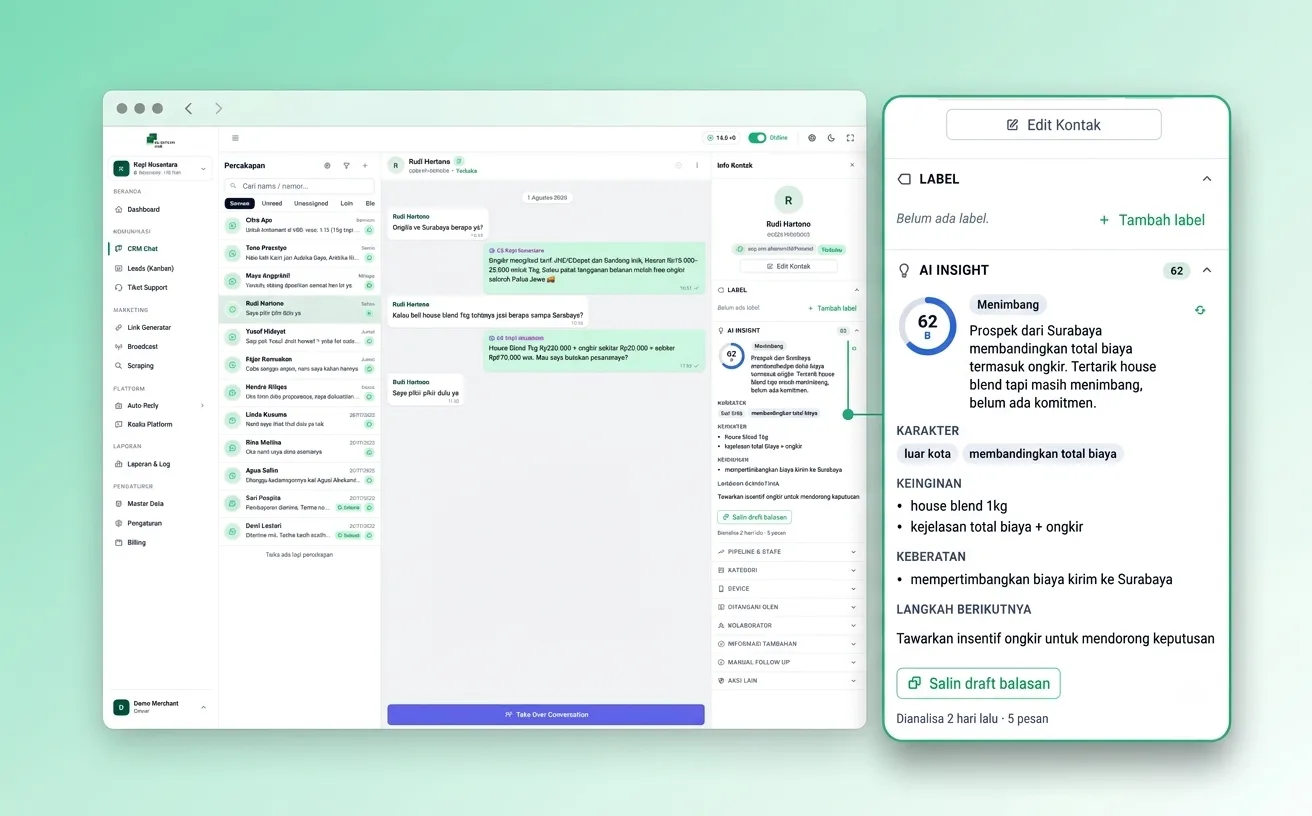
The shared inbox with the AI Insight panel beside the conversation.
CRM Chat

One inbox for the whole team, and a history that doesn't quit when people do

Conversations from every channel land on one screen. Each chat has an owner, a status, labels, and a full history stored on your server, not on anyone’s phone. The “Unassigned” filter makes sure no customer is left waiting because everyone assumed someone else had it.

  • No orphan chats. Every conversation can be assigned to a specific agent
  • Contacts and history live in the system, not on staff devices
  • Quick replies and message templates for answers you give over and over
  • A Take Over button, so a person can step in for the AI at any time
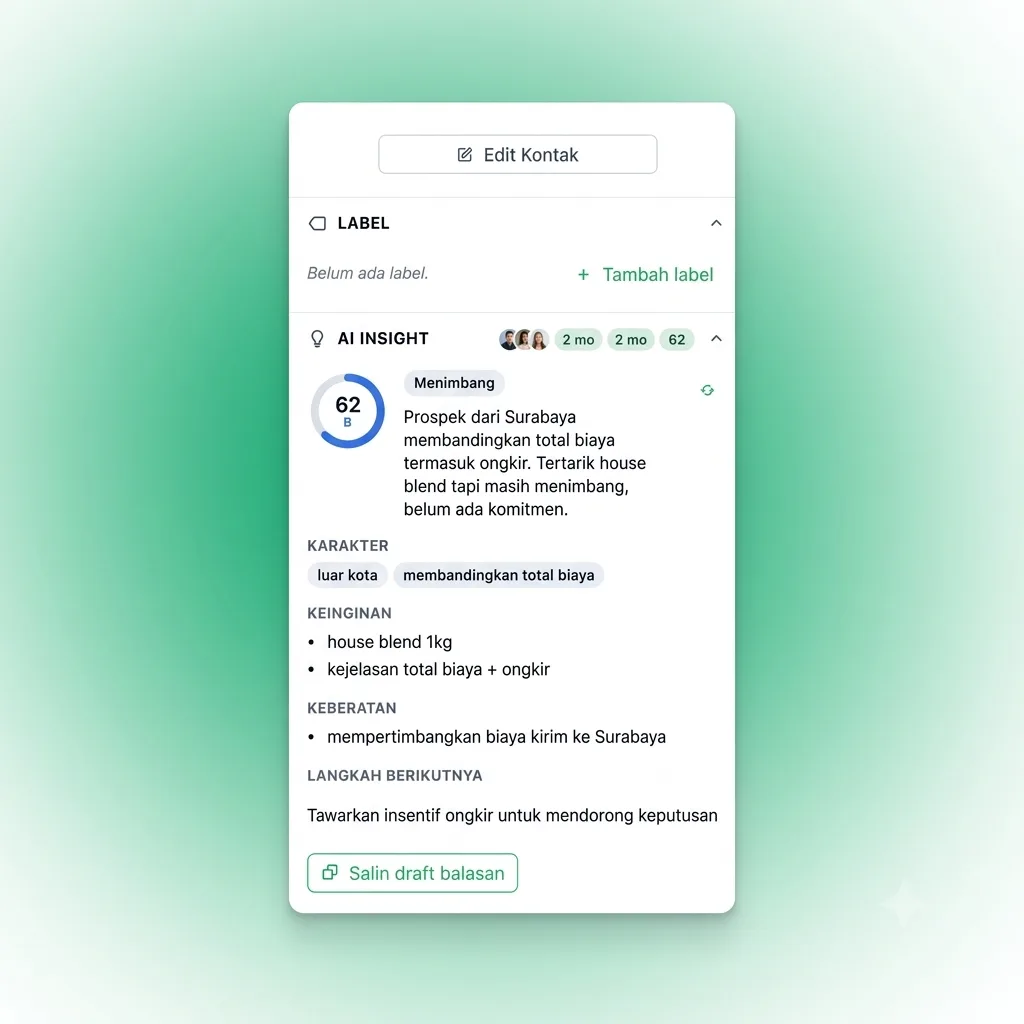
AI Insight panel: score 62 “Weighing it up”, the objection read, the next step, and a draft reply.
AI Insight

AI reads every prospect: the score, what they want, and what you never answered

Your team has hundreds of conversations and can't possibly read them all. The AI reads every one and puts its conclusion right next to the chat: how warm the prospect is, what stage they're at, what's holding them back, and what to do next, with a draft reply ready to copy.

  • A 0–100 score and buying stage, worked out from the conversation itself
  • An “unanswered” list: customer questions that got buried in a long thread
  • The open objection, meaning the thing actually holding up the close
  • Churn risk flagged early, before the one-star review shows up
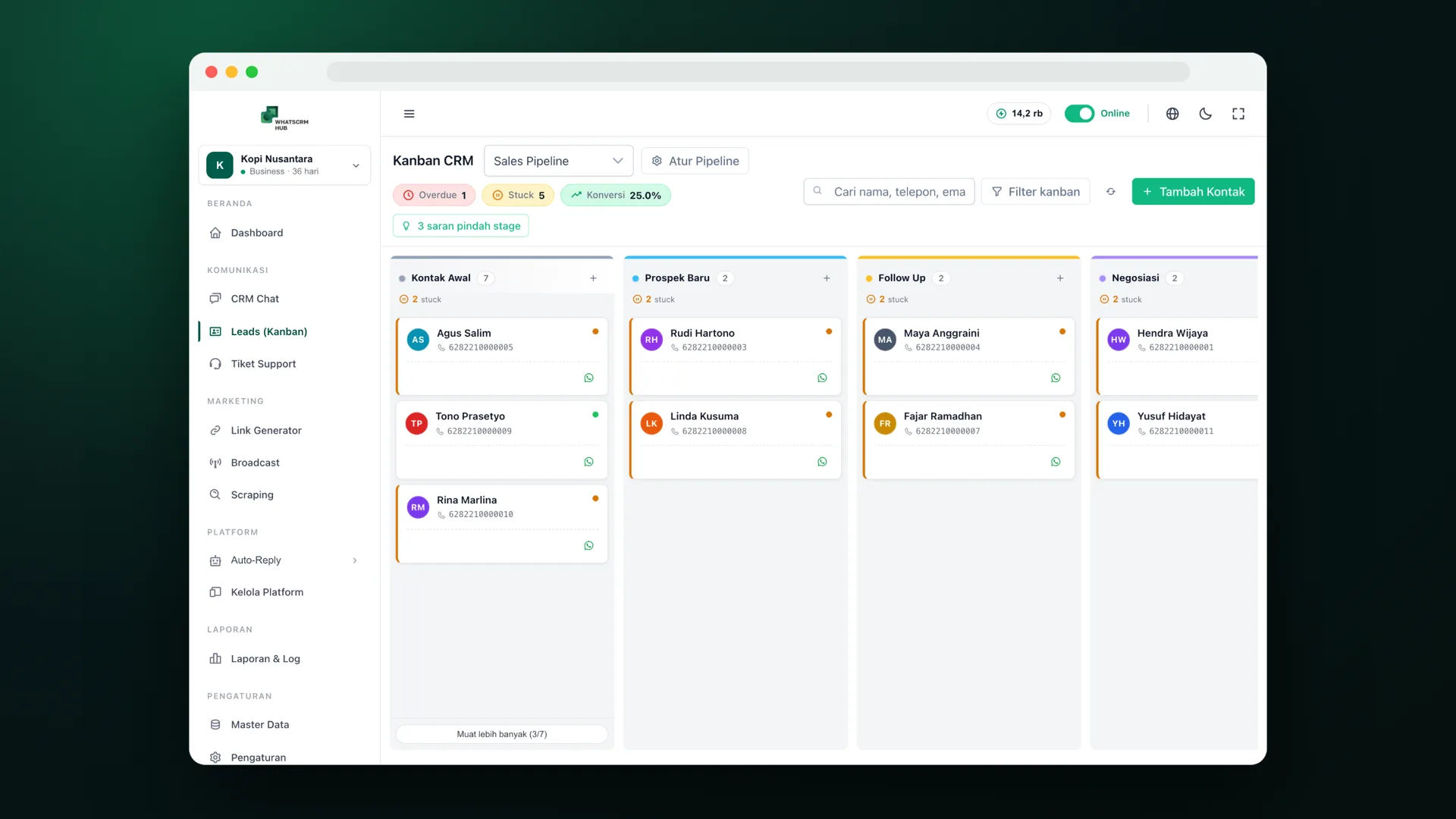
CRM Kanban with Overdue and Stuck markers, 25% conversion, and three AI stage-change suggestions.
Leads Kanban

A lead board that tells you which deals are going cold

Contacts move through stages you define. Unlike an ordinary kanban board, this one checks its own pipeline health. Deals that sit too long get marked Stuck, late follow-ups get marked Overdue, and the AI suggests a stage change when the conversation shows things have already moved.

  • Overdue and Stuck badges show up before the monthly review, not after
  • AI suggests stage changes, but you still approve them
  • Every move is saved as history, not just the final position
  • Conversion for each pipeline shows right above the board
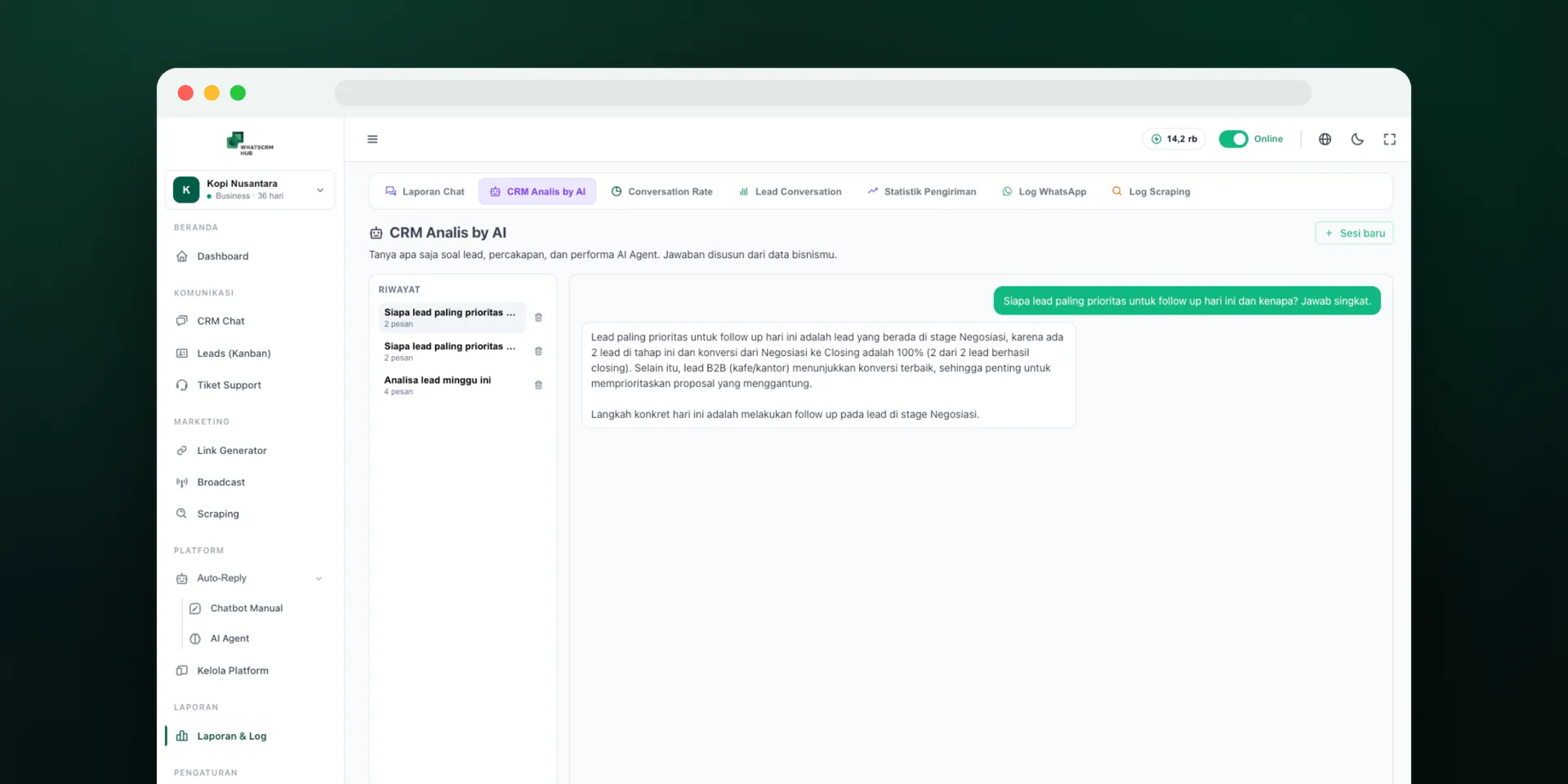
CRM Analyst by AI answering today’s follow-up priority and explaining why.
CRM Analyst by AI

Ask about your business and get answers from your own data

Reports show numbers, but they rarely tell you what the numbers mean. Type a question in plain language, like “who is my highest-priority lead today?” or “any customer at risk of churning?”, and the AI answers with the contact, the score, and the reason.

  • Answers come from your pipeline, chat analysis, and service performance
  • If the data isn't there, it says so instead of making up a number
  • Get a morning briefing from one question instead of five separate reports
  • Analysis threads are saved so you can come back to them
Screenshots from the live system. Names and figures are sample data.
What is inside

Seventeen work modules, one login

This isn't a feature list for show. It's the daily work that already happens in your business, now in one place.

Operations

CRM Chat
A shared inbox for 6 channels, with an owner, status, and labels per conversation.
Leads (Kanban)
A pipeline with your own stages, stuck & overdue markers, and full movement history.
Support Tickets
Complaints get a number, an owner, a category, and a deadline instead of getting lost in an internal group chat.

Intelligence

AI Insight
Score, buying stage, objections, unanswered questions, and a draft reply on every contact.
CRM Analyst by AI
Ask anything about leads, conversations, and team performance — answered from your own data.
AI Agent + SOP audit
AI answers from your business documents, then gets audited for compliance rule by rule, with quoted evidence.

Sales

Sales Manager
Numbered quotes with price, deadline, and closing target. One contact can have several quotes.
Sales Performance
Funnel, win rate, average discount, and closing speed per person.
Sales Commission
The system calculates it the moment a deal is won. Pending → Approved → Paid, with every step traceable.
Teams, Targets & Bonus
Team and individual targets, manager commission, and period bonuses, all linked together.

Control

Conversation Rate
Per agent: conversations handled, first-response speed, and how many went further.
Response Time
Measured per conversation, not as a team average. Human and AI replies are counted separately and follow your business hours.
Chat Report
Contacts that came in that day with their pipeline status, so the untouched ones are impossible to miss.
Lead Conversation
How leads move between stages, and exactly where most of them drop off.

Daily support

Automated follow-up
Follow-up sequences for prospects who went quiet. They stop on their own as soon as someone replies.
Scheduled broadcast
Send to thousands of contacts by label and category, delivered in waves with reporting for each message.
Link Generator
Click-to-chat links with a pre-filled message, for ads, social bios, or catalogs.
Contact scraping
Pull prospects from Google Maps or WhatsApp groups to fill the top of your pipeline.
Labels & categories
Your own contact segments, used to target broadcasts and filter reports.
Human agents & shifts
Team accounts, working hours for each agent, and automatic assignment of incoming conversations.
Roles & permissions
Control who sees what, down to individual features, including limiting reps to their own data.
Multi-business
Run several business units in one account, with their data kept truly separate.

Mobility

Mobile app (iOS & Android)
Reply to chats, move lead cards, close tickets on site, send broadcasts, and get notifications. It talks to the same system as the web version, so there's nothing to sync.
Who it's for

Three different roles, one source of data

Owners, sales managers, and support leads ask the same system different questions.

Business owner

“How many buyers did you lose on WhatsApp this week without ever knowing?”

Before You find out about a problem once the customer is already angry
After AI flags churn risk early and suggests a way to recover
Before Follow-up depends on what the team remembers
After Stalled prospects get marked stuck/overdue, plus AI stage suggestions
Before Every chat looks equally important
After Every contact carries an intent score and a next step
Before Ask for a report → wait for someone to put it together
After Ask the AI and get an answer from real data right away

Sales manager

““I already followed up.” And you have no way to prove otherwise.”

Before Status filled in by hand, based on what the rep says
After Status inferred by AI from the chat that actually happened
Before Cold deals surface at month end
After Stuck and overdue deals flagged this week, with stage suggestions in real time
Before Coaching based on closing numbers
After Coaching based on SOP breaches, quoting real conversations
Before Forecasts based on team optimism
After Forecasts based on scores and buying stages from chat signals

Support lead

“Two agents both handle 200 chats a month. One produces 30 leads, the other 6.”

Before Judged on who looks busiest
After Conversation rate per agent: handled, responded, continued
Before Team averages hide the worst cases
After Response time per conversation, with the fastest and slowest both visible
Before Complaints get lost in the internal group chat
After Numbered tickets with an owner, category, and deadline
Before SOPs get broken and nobody notices
After Rule-by-rule SOP audit that quotes the exact sentence
The difference

Why this isn't “a regular CRM with WhatsApp bolted on”

Almost every CRM has a WhatsApp button now. The real difference is where the data comes from and who has to type it in.

A typical CRM
Pipeline data is entered by hand. If a rep forgets or can't be bothered, the CRM stays empty, and your report ends up wrong without anyone lying.
WhatsCRM Hub
Data comes from conversations that actually happened. Reps don't have to enter anything for the history to exist.
A typical CRM
WhatsApp is a bolted-on integration. Chats happen in another app, and a summary gets copied into the CRM when someone has time.
WhatsCRM Hub
The inbox is where the work happens. There's no “copy it into the CRM” step for anyone to skip.
A typical CRM
Reports measure activity, like how many chats and how many calls. Nobody measures quality.
WhatsCRM Hub
AI also reads what was said: lead score, buying stage, open objections, churn risk, and how good your team’s answers are.
A typical CRM
Commission and targets live in a separate spreadsheet that gets rebuilt every month and argued over every month.
WhatsCRM Hub
Commission, team targets, individual targets, and bonuses live in the same flow as the sale, with an approval trail.
A typical CRM
“AI” means a keyword FAQ bot that answers confidently, and wrongly, as soon as a question isn't on its list.
WhatsCRM Hub
AI answers from your business documents, its answers get audited, and you can ask it about the state of your own CRM.
A typical CRM
Your customer data sits on someone else’s server, and your access ends when the subscription does.
WhatsCRM Hub
Use it as a ready-made service or install it on your own server. That choice starts to matter once your customer database is worth something.
1 screen
for 6 message channels
0 recaps
of manual commission per month
100%
of history kept in the system
2 ways
AI answers and gets graded
Business model

One system, three ways to run it

WhatsCRM Hub was built multi-tenant from day one. It isn't a single-company app that got stretched to serve many clients later. So the same system can run your own business, or be rented to other businesses under your brand.

Run it yourself

For businesses that sell through conversations and want to stop relying on what the team remembers.

  • Several business units in one account, with separated data
  • Unlimited team members, each with their own role and permissions
  • Install it on your server or run it on our cloud
Most popular with resellers

Resell it as SaaS

You become the provider. Your clients pay a monthly subscription for a platform with your name and logo. They never see ours.

  • Multi-tenant engine: each client gets its own data space
  • No cap on the number of tenants
  • 100% white-label and rebrandable: name, logo, colors, domain
  • Subscription plans and billing configured per tenant
  • You keep 100% of the revenue. No revenue share, no royalties

Install it on your client’s server

For corporate clients whose data can't leave their own infrastructure, a requirement that shows up in more and more tenders.

  • On-premise deployment or the client’s own VPS
  • Customer data never sits with a third party
  • Works with country-level data residency requirements
Ready to cross borders

Multi-language and multi-currency from day one

Resellers rarely stop at one country. The platform already speaks Indonesian, English, Arabic (with a full right-to-left layout), and Brazilian Portuguese, each with its local currency.

This page runs in all four languages. Click a card below and both the language and the price currency change. The Arabic version uses a full right-to-left layout, not just translated text.
Run the numbers first

Before you look at the price, compare it with these three numbers

The question is never “cheap or expensive?” but “compared to what?” These are the three numbers people usually skip when they size up a system like this.

$420
per month
The leak you already have

Five chats a day that never make it into the pipeline add up to 150 opportunities a month. At a 10% conversion rate and an average order of just $28, that's what you lose every month, and it never shows up in any report.

$8,500–13,600
to build once
If you built it yourself

One senior engineer at $1,420–2,270 a month for at least six months before a first version runs. That doesn't include the mobile app.

$11–113
per month, forever
If you subscribed to a similar SaaS

You pay for as long as you use it, the bill goes up with your user count, and access stops when payment stops. The data never becomes yours either.

All three figures are worked examples based on the assumptions on each card. Plug in your own numbers. The comparison matters more than our math.

Web + Mobile package

Web and mobile app in one license

This bundle puts the web system and the iOS & Android mobile app under a single one-time license. Pay once, with no monthly fee and no revenue share.

Regular price
$499
One-time license
$299
One-time purchase · Lifetime
Save $200
or in installments from $100
Not sure yet? Get a free demo first. You can also try it on your own server for free, with an optional $20 configuration service.
Pay once A lifetime license, not a subscription
No monthly fee No revenue share, no royalties
Resale allowed Unlimited tenants, under your name
Ask about the Web + Mobile package
Message us first. We'll tell you whether it's a fit before you pay anything.
When it pays for itself
If this system does nothing except plug the leak above, it covers the license within the first month.
If you resell it, three clients at $28 a month cover it in four months. From the fourth client on, it's margin.
After that, there's no monthly license cost ever, no matter how many tenants you run.

What the bundle includes

The complete web system — all 17 modules above
iOS & Android mobile app, connected to the same system
Multi-tenant SaaS engine: rent it to unlimited tenants
100% white-label, rebranded as your own product
Free VPS installation + onboarding video call
3 months of bug support
Free updates during the 3-month support period
Marketing kit and sales playbook so you can start selling
Pay in full or in installments

What to know before you buy

  • A one-time license with no monthly fee and no cut of your revenue.
  • Not sure yet? Start with a free demo with our team. You can also try it on your own server for free. We only charge $20 for the optional configuration service. If it fits, pay in full or in installments.
  • Server/VPS costs and third-party costs (like Meta's official WhatsApp Business API, or AI credits) aren't part of this license. You pay those directly to the providers.
  • This package is a compiled build with no source code. The Full Source Code package ($799, was $1,599) is on the pricing page, and you can upgrade later by paying the difference.
Licenses already running
CSHub.id Ping.co.id CepatAI CRM Indonesia Soxio Ruang WA

Questions people usually ask before deciding

In other CRMs, chats happen in a separate app and someone copies a summary over when they have time. Here, the inbox is where the work happens, so the data comes straight from the conversation. On top of that, AI reads what was said (score, objections, churn risk), and commission and targets live in the same flow as the sale.

Yes, and it's one of the setups we actively support. The engine is multi-tenant, there's no cap on tenants, and you can rebrand it 100% with your name, logo, colors, and domain. All subscription revenue from your clients is yours. We take no revenue share or royalty.

Yes. Every tenant has its own data space and can't see any other tenant’s data. Inside each tenant there's another layer: roles and permissions control who sees what down to feature level, including limiting reps to their own records.

It's up to you. You can install the system on your own VPS or server so the data never sits with a third party, or run it on our cloud if you'd rather not manage infrastructure. For corporate clients and government tenders, the on-premise option is usually what decides it.

You get the complete web system plus the iOS & Android mobile app, the multi-tenant engine, white-label rights, free installation, 3 months of bug support, and free updates during those 3 months, delivered as a compiled build. You can pay in full or in installments. Before buying, you can see a free demo with our team, or try it on your own server for free with an optional $20 configuration service.

Not for the license. What you keep paying for is what actually runs outside the system: your server or VPS, and any third-party services you use, like Meta's official WhatsApp Business API or AI credits. You pay those providers directly, not through us.

Indonesian, English, Arabic, and Brazilian Portuguese, with IDR, USD, SAR, and BRL. The Arabic version uses a full right-to-left layout, not just translated text. That's the kind of thing that usually only turns into a problem after you've signed your first Middle East client.

Yes, for both iOS and Android, and it's the whole point of this bundle. The app talks to the same system as the web version, so there's nothing to sync. What a rep changes in the field shows up in the office report right away, and vice versa.

Our team handles the VPS installation, which is usually done within hours, followed by onboarding on a video call. What really sets the pace is how ready you are: pipeline stages, SOP rules, and the business documents the AI will learn from.

You can use WhatsApp multi-device (with the number you already have) or Meta's official WhatsApp Business API. Both are supported. For high broadcast volume and compliance needs, we recommend the official API. Our team will walk you through the costs of each before you decide.

See it with your own business data

Reading this page to the end won't tell you as much as watching your own pipeline move into it. Book a 15-minute demo with a real person.

Ask on WhatsApp
No commitment, no credit card.